Apple Log on iPhone.
Apple Log is the flat recording profile on iPhone 15 Pro and later Pro models. It keeps more highlight and shadow detail for grading, but it needs to be exposed and converted correctly.
What Apple Log is
Normal iPhone video bakes in contrast and colour. Apple Log records a flat, washed-out picture that keeps the full range of the sensor, so you decide the contrast and colour later. It is available on iPhone 15 Pro, 15 Pro Max and later Pro models. Because Log files are flat, they always need converting or grading before they look right.
Step by step
- In CineCut, tap Record footage, then PRO · LOG to open the pro camera.
- Choose Log as the colour, then the resolution, frame rate and codec (ProRes or HEVC).
- Turn on zebras and set exposure so only the brightest highlights show stripes; use the histogram as a check.
- Set the shutter to about double the frame rate (1/50 at 25 fps, 1/60 at 30 fps) for natural motion blur, and lock white balance.
- Record. Back in the editor, open Color › Looks and pick a look from the For Log folder, or Log → HDR for a neutral starting point.
- Fine-tune with Adjust and Grade, then export.
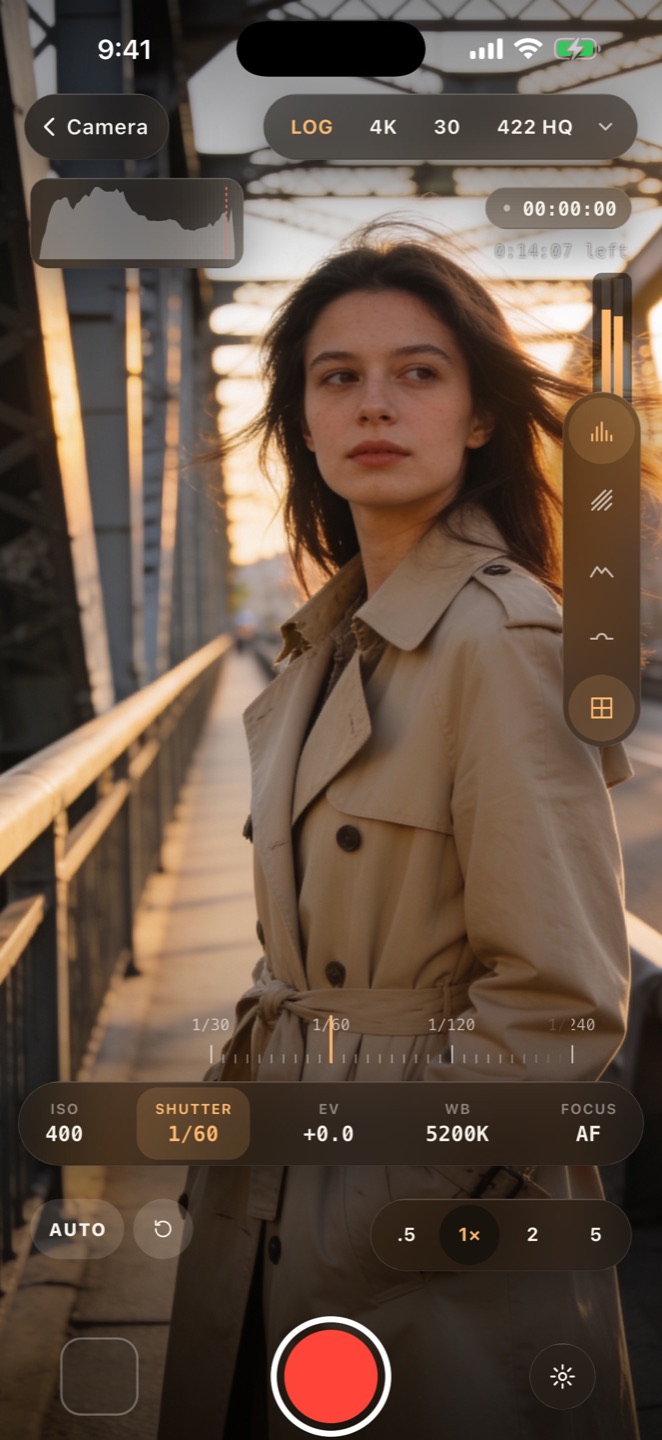


Exposure for Log
- Log footage tolerates over-exposure better than under-exposure: noise in the shadows is the usual problem. Expose a little brighter than looks natural on a normal camera, but keep the sky out of the zebras.
- Lock focus and exposure (touch and hold on the picture in CineCut's pro camera) so they do not hunt mid-shot.
- Preview a look while you shoot: the LUT button on the camera's side rail shows a Log look, or your own .cube LUT, on the viewfinder without changing the recording.
Grading Log on the phone
CineCut converts Log to the iPhone's own HDR rendering, with extra highlight roll-off, and then grades the look on top. That means the looks made for HDR footage also work on Log. If you have your own LUTs made for Apple Log, import them from Color › Looks › My Looks › Import LUT; on Log clips they read the Log values, as Log LUTs expect.
CineCut is free on the App Store for iPhone and iPad. Every editing tool is free; Pro removes the watermark and unlocks the AI tools.
Download CineCut